At the last GGLC autocross Alex and I decided to try out a little experiment to see how your heart rate changes during the race. We used a Polar S720i to record his heart rate, an iPhone for video and a DL1 data logger to record G-force and speed readings. I used some simple PHP magic to sync the two data files together and used the Chasecam Dashware system to create this finished video.
You can see the speed, heart rate (BPM), longitudinal G (acceleration + braking) and lateral G in the dashboard on the top of the video. His average heart rate was in the low nineties while on the grid and rises to to 101 just before the start of the run. As the run progresses you can see it quickly rise all the way to 145 bpm by the end of the 45 second run. Just as interesting is the way his heart rate falls as soon as the run ends and drops to the low 130s just 10 seconds after the run. So now if anyone asks you why you autocross just say its for the health benefits
Unfortunately the video quality is not as perfect and the heart rate only updates every 5 seconds but all in all it was a successful test of the system. I have already ordered a Polar RS800CX (1 sec resolution) and I plan to run this same setup for the duration of the Lemons race at Buttonwillow next month. So stay tuned for the health benefits of endurance racing
My prize for the second fastest time of the day at the opening GGLC Autocross of the season.
I ran a 53.139 and was only beaten by a race-prepped Evo running slicks. The prizes did not include the instructors times though I was actually faster than all but 3 (Jason and Alex on RA1s and Rob on slicks) of them as well. My goal for the season is to beat Alex with the added incentive that I will be upgraded to instructor if I do – seeing that I already beat his time in the morning session yesterday I am pretty confident I can do it again. I just feel sorry for my future students
Thanks to norcalturbo for this photo of me from the morning session.
The last video is Nithyas best run (46.5) of the day in the GTI. For someone who almost backed out of her first event, she is becoming very good at this. If you have never tried autocrossing you should come down to one of the GGLC events next season and give it a try – it is safe, fun and the best way to learn car control.
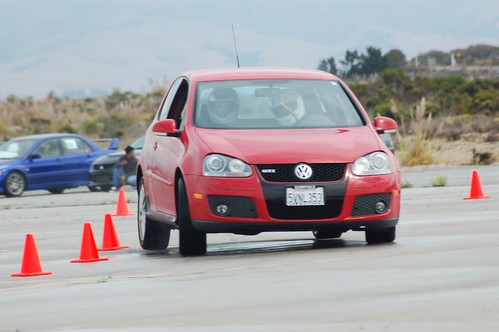
Last weekend Nithya and I took our GTI to the GGLC Autocross at the Marina airport. The performance far exceeded my expectations and at 61.7 seconds I was actually the 3rd fastest driver in very wet morning session (the fastest Elise did a 64.x). Much of this was due to the fact that it had proper wet weather tires on, but the handling was pretty amazing – very predictable with some understeer at the limit. It did of course feel quite a bit heavier than the Elise but the direction changes were quick and chassis was very forgiving. As the track dried out I lost my performance advantage over the elises but as you can see in the photo I did manage to get a wheel off the ground
This was also the first Autcross for Nithya as a driver. She started out very slowly with a 130 second lap but by the end of the day she was down 66 seconds – by far the greatest improvement of any driver at the event ans just 6 seconds off my best lap. She had so much fun that she’d decided to attend all future events, we’ve already signed up for the November event. The following video is of her last run – notice the tire squeal in the turns and the cones she destroys near the end
I am a great fan of in-car video during HPDEs. It is a great tool to analyze your performance and see how different lines have affected you laptimes – works even better when you have a DL1 or some other data logger. In-car video is also a great way to give people an idea of what its like to track a car and maybe even understand you keep grinning from ear to ear after each event.
However when I see the average setup (for an Elise) at an HPDE it looks to go one of two ways
1) The full on treatment: This is a full on video system that gives you the best quality video and audio and will usually record several hours without any issues. Some of the equipment that this requires is
This kind of a setup will give you close to pro level AV and is the next best thing to actually sitting in the car. However the total price tag of around $1200 bucks (not including harness installation) is usually out of the price range of all but the most avid track junkies.
2) Track video lite: This setup tries to replicate the quality of the track video but uses consumer grade electronics and usually does not leave any permanent alterations to the car. The parts list includes
Solid state Camera: $300-$500 for either commercial point and shoot camera or a consumer camcorder
Solid state memory: ~$100 for a 4 GB CF card
Portable storage: Since these cameras fill up memory very quickly you will have to download the video between sessions to either a laptop or a storage solution like the Wolverine ($150)
This system is considerably cheaper (~$550 excluding storage) and is probably the most popular HPDE setup. The quality is pretty decent (800 x 600 or 640 x 480) though people say that the vibration affects the image stabilization systems on these cameras and track life is only about 2 years. Additionally you have to use some sort of storage system to suck the video out between lap sessions and that can get tiresome. While you can mix and match components to get a setup for < $500, it's still quite pricey for someone who is still deciding how much to invest in track equipment.
A looking for a cheaper alternative
This got me thinking about possible ways to record video for free to see how useful it is before actually investing in a full on setup. One of the most ubiquitous technologies to emerge in recent years has been the cameraphone which invariably has a video mode as well. Now off course the video quality of the cameraphone is dependant on the device, but newer devices usually have at least 2 megapixels and can use large memory cards to store virtually limitless video. Phones are built to withstand rougher use than a camera (they go through several types of drop tests) and being solid state they are less affected by vibration. I then decided to build my own in-car video setup using a cellphone.
My Setup
The latest device that I have been playing with is the Nokia N73 which has a 3.2 megapixel camera and can hold 2GB miniSD card. It records video at a resolution of 320 x 240 and saves it as mp4 files which can be read on any PC. Since an hour of video only takes ~300 MB, I knew that a 2GB would be more than enough to record video for an entire track weekend. I didnt mind spending the money (~$40) on the card because I knew that even if I didn’t use it for video I would definitely use it to store music on my phone.
The mounting device was little trickier, the cameraphone has no mount points on it which meant that I couldn’t use any of the traditional mounting systems (would have been out of my budget anyway). However while looking at the interior of the car I realized that the back window of the Elise is perfectly vertical and if I could attach the phone to the window I would probably be able to get a good view out the front.
When it came to the actual attachment I decided to use painters tape instead since it has relatively high shear strength and leaves no residue which is important since I didn’t want to mess up my phone. Additionally the N73 only weighs a 116 grams which will barely put any shear forces on the tape. This mounting system will of course only work for candybar style phones and not clamshells because you cannot tape an open clamshell to the inside of the window. You begin by taking a 2-3 foot strip of painters tape and cut a small hole in the center for the lens.
You then open the lens cap of the phone if any and place it on the tape such that the lens is right over the hole. If your phone does not have a side accessible button to turn on the camera you will have to turn on the camera and start recording at this point.
Now you just take the strip (with the phone attached) and tape it to the bottom edge of the rear window. You can add some padding material between the glass and the phone though I found that this really wasn’t necessary.
Thats it – just remember to turn on the phone camera at the start of every session.
The video shot this way is obviously not as good as the video from the earlier systems but for its price ($40 for the card and $1 for the tape) it gives more than enough detail to understand what is happening at the track. Additionally if you are going to post the video online on YouTube, Google Video or Yahoo video, these system usually transcode your video down to 320 x 240 anyway so you arent really loosing that much quality. I am looking forward to getting my hands on the new Nokia N95 which shoots video at 640 x 480 – that should really give the other systems a run for their money
You can download a full resolution video from here (9 MB transcoded WMV). I have also made a JumpCut video of my best lap (and a small ‘incident’) with captions and other fun stuff – RSS readers point your browsers here.
UPDATE: I have posted some sample track video from the N95 in a separate post – the video quality is dramatically better and good enough to postpone my PDR100 plans
RT @cjmartin: Fun to see one of @rnair's photos (http://flic.kr/p/aPeaf) featured in this video created using CC Flickr photos: http://b ... 2010/08/18
Just got Sir Stirling Moss to sign my Lotus F1 heritage poster 2010/08/14