Posts Tagged ‘HPDE’

Recording in-car video for free

Tuesday, February 27th, 2007

I am a great fan of in-car video during HPDEs. It is a great tool to analyze your performance and see how different lines have affected you laptimes – works even better when you have a DL1 or some other data logger. In-car video is also a great way to give people an idea of what its like to track a car and maybe even understand you keep grinning from ear to ear after each event.

However when I see the average setup (for an Elise) at an HPDE it looks to go one of two ways

1) The full on treatment: This is a full on video system that gives you the best quality video and audio and will usually record several hours without any issues. Some of the equipment that this requires is

This kind of a setup will give you close to pro level AV and is the next best thing to actually sitting in the car. However the total price tag of around $1200 bucks (not including harness installation) is usually out of the price range of all but the most avid track junkies.
2) Track video lite: This setup tries to replicate the quality of the track video but uses consumer grade electronics and usually does not leave any permanent alterations to the car. The parts list includes

  • Suction cup mount: $40-100 at Chasecam
  • Solid state Camera: $300-$500 for either commercial point and shoot camera or a consumer camcorder
  • Solid state memory: ~$100 for a 4 GB CF card
  • Portable storage: Since these cameras fill up memory very quickly you will have to download the video between sessions to either a laptop or a storage solution like the Wolverine ($150)

This system is considerably cheaper (~$550 excluding storage) and is probably the most popular HPDE setup. The quality is pretty decent (800 x 600 or 640 x 480) though people say that the vibration affects the image stabilization systems on these cameras and track life is only about 2 years. Additionally you have to use some sort of storage system to suck the video out between lap sessions and that can get tiresome. While you can mix and match components to get a setup for < $500, it's still quite pricey for someone who is still deciding how much to invest in track equipment.

A looking for a cheaper alternative
This got me thinking about possible ways to record video for free to see how useful it is before actually investing in a full on setup. One of the most ubiquitous technologies to emerge in recent years has been the cameraphone which invariably has a video mode as well. Now off course the video quality of the cameraphone is dependant on the device, but newer devices usually have at least 2 megapixels and can use large memory cards to store virtually limitless video. Phones are built to withstand rougher use than a camera (they go through several types of drop tests) and being solid state they are less affected by vibration. I then decided to build my own in-car video setup using a cellphone.

My Setup
The latest device that I have been playing with is the Nokia N73 which has a 3.2 megapixel camera and can hold 2GB miniSD card. It records video at a resolution of 320 x 240 and saves it as mp4 files which can be read on any PC. Since an hour of video only takes ~300 MB, I knew that a 2GB would be more than enough to record video for an entire track weekend. I didnt mind spending the money (~$40) on the card because I knew that even if I didn’t use it for video I would definitely use it to store music on my phone.

The mounting device was little trickier, the cameraphone has no mount points on it which meant that I couldn’t use any of the traditional mounting systems (would have been out of my budget anyway). However while looking at the interior of the car I realized that the back window of the Elise is perfectly vertical and if I could attach the phone to the window I would probably be able to get a good view out the front.

When it came to the actual attachment I decided to use painters tape instead since it has relatively high shear strength and leaves no residue which is important since I didn’t want to mess up my phone. Additionally the N73 only weighs a 116 grams which will barely put any shear forces on the tape. This mounting system will of course only work for candybar style phones and not clamshells because you cannot tape an open clamshell to the inside of the window. You begin by taking a 2-3 foot strip of painters tape and cut a small hole in the center for the lens.

You then open the lens cap of the phone if any and place it on the tape such that the lens is right over the hole. If your phone does not have a side accessible button to turn on the camera you will have to turn on the camera and start recording at this point.

Now you just take the strip (with the phone attached) and tape it to the bottom edge of the rear window. You can add some padding material between the glass and the phone though I found that this really wasn’t necessary.

Thats it – just remember to turn on the phone camera at the start of every session.

The video shot this way is obviously not as good as the video from the earlier systems but for its price ($40 for the card and $1 for the tape) it gives more than enough detail to understand what is happening at the track. Additionally if you are going to post the video online on YouTube, Google Video or Yahoo video, these system usually transcode your video down to 320 x 240 anyway so you arent really loosing that much quality. I am looking forward to getting my hands on the new Nokia N95 which shoots video at 640 x 480 – that should really give the other systems a run for their money :-)

You can download a full resolution video from here (9 MB transcoded WMV). I have also made a JumpCut video of my best lap (and a small ‘incident’) with captions and other fun stuff – RSS readers point your browsers here.

UPDATE: I have posted some sample track video from the N95 in a separate post – the video quality is dramatically better and good enough to postpone my PDR100 plans

  • Share/Bookmark

Heading to Thunderhill on Sunday

Friday, January 26th, 2007

Heading to Thunderhill tomorrow

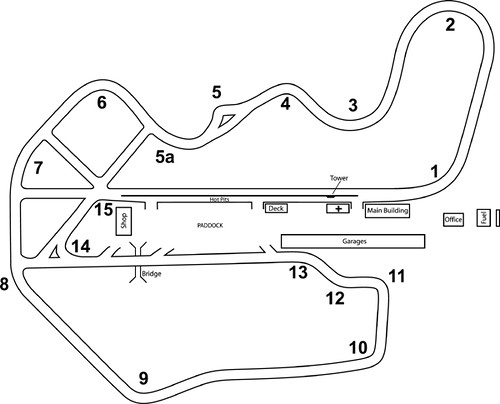
(image from http://www.thunderhill.com/)

Got a chance to get some cheap tracktime ($140 for 3.5 hours) at Thunderhill on Sunday with Bonnie and T.E.A.M. She runs some great events and while the groups are not as fast as NCRC it should be good fun. I’ve only been to Thunderhill once before and that was on a wet-dry kind of day which is never good for building a good rhythm. I even had my first (and so far only) spin while coming out of turn 6 – the entry was dry but the exit was wet which led to me losing the rear and doing a full 180. Even though I stayed on track and did no damage to the car it really drove home the point about how easily things can go wrong and how quickly you lose control. Everyone should get a little bit of track time as it makes you a much better, safer and more controlled driver on the road.

  • Share/Bookmark

Reno-Fernley Raceway track weekend [Orig posted: 09/09/2006]

Saturday, January 20th, 2007

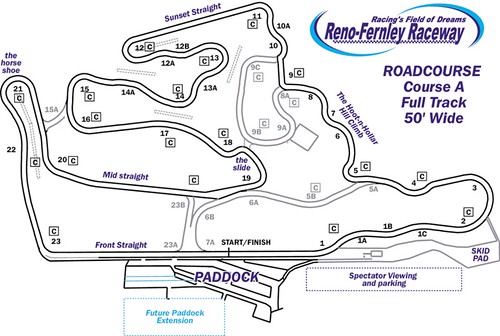
Reno-Fernley course map

I spent the weekend of Aug 26-27 at a track weekend at Reno-Fernley Raceway with TEAM racing. It was my first time with both the track and the organization and I must say I had a great time. RFR is a terrific track containing both (Elise friendly) twisty bits and some long straights (not so Elise friendly). There are some blind corners that require quite a bit of commitment but if you once get the layout down it is a very rewarding experience. Turns 3 through 11 in particular are my favorite portion of the track where you have to manage you throttle carefully to stay under the rev limiter and on-cam through the entire section.

I started out on day 1 running laps in the 3:40 range while I was still learning the track. I was lucky enough to get a couple of sessions with Alan C as my instructor which helped me bring my laptimes down to a consistent 3:28-3:29 range with one blinder of a 3:23 (no idea how that one happened). The esses at the turn 1 complex were the most difficult for me since it took me quite a while to start going through without braking at the straight. Once I built up the courage (read balls) to push it I was able to sail through pretty easily at an indicated 100 mph. Turns 12, 15 and 23 were going to be my main focus for day 2.

My target for day 2 was to hit 3:20 and I was able to dip under 3:25 pretty much straight away before hitting a bit of a wall. I was getting the hang of 12 and 15 though 23 was another corner where I just didn’t have the balls to go though at full speed. One of the instructor then did a couple of lead/follow laps with me which made me realize that I was taking the wrong line through the chicane at 18 and the straight between 19 and 20. I was able to make some tiny adjustments which led to a sequence of 3:20, 3:21, 3:22, 3:20 in session 4 which was my fastest of the weekend. The image below shows a speed coded map of my lines on my two fast laps.

Datalog images of my fast laps at Reno-Fernley

As you can see I got identical lap times using two very different lines especially through 15 and 18. Turn 18 is the most difficult one for me because it is after the crest of blind turn 17 and which makes me very unsure of my braking and turn-in points for 18. I would estimate that I have left at least 5 seconds out on the course and I should be able to run 3:15s the next time I go up there.

All in all it was a great weekend where I learnt a lot and had an amazing time on the track. My personal highlight was on day 2 when I passed a 911 turbo and viper down the front straight – it feels soooooo good to pass cars with well over double my horsepower.

P.S.: To learn the fast line at RFR check out Tam’s post at EliseTalk where he describes the line he was taking in his race prepped Evo. He was by far the fastest car out there running a best of 3 minutes flat.

  • Share/Bookmark