I just downloaded the latest version of Yahoo Go on my Nokia N95 and was blown away to find that it has GPS support for maps and navigation. I am on an roadtrip right now and will be use it for direction the rest of my trip. What makes it even more interesting is the fact that I have been using Nokia Maps (aka Smart2Go) for the past 10 days which should make for an interesting comparison – I’ll post a detailed comparison/review once I get home in about a week.
Archive for June, 2007
Yahoo! Go: Now with GPS support
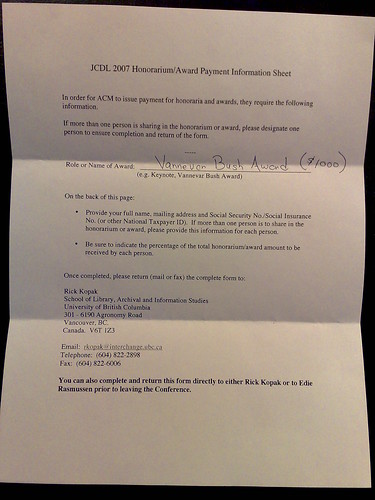
Saturday, June 23rd, 2007Vannevar Bush Best Paper Award
Thursday, June 21st, 2007
Our paper titled “World Explorer: Visualizing Aggregate Data from Unstructured Text in Geo-Referenced Collections” just won the Vannevar Bush Best Paper Award at JDCL 2007. A big thanks to my co-authors Shane Ahern, Mor Naaman and Jeannie Yang for all their help in both building the system and writing the paper – it was a great joint effort. You can read the paper, see the demo or look at my slides below.
Judith Bush has a report about my presentation as well.
Trip tracker
Friday, June 15th, 2007
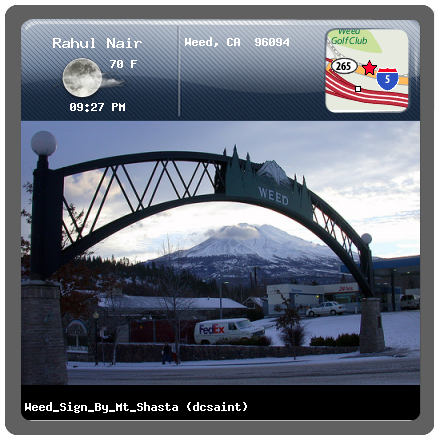
Trip tracker is a quick hack that I created using the FireEagle location platform from Yahoo! Research Berkeley and is designed to convery a quick summary or what I’m doing during my summer holiday. The first part is a badge image (above) that shows you some quick summary about my current location. It shows you the following things
Location: A map tile of my location which zooms appropriately based on the accuracy of the available location. This is obtained from the wonderful Yahoo! Map Image API. It also prints out the location in text. I seem to be running into some rate limiting issues with this api so the image may not always load.
Weather: This is collected from the Yahoo! Weather API and is displayed as an icon along with the temperature in Fahrenheit. the icon respect sunrise/sunset times and updates based on the lighting in that location.
Time: Current time in MY (not your) location
Photographs: This is my favourite part of the badge and its a best guess as to the Flickr image most relevant for my current context. The algorithm searches Flickr in the following order
- Get my most recent photograph (limit 1 hour)
- Get the last photo I took in this location (5 mile radius)
- Get the Flickr geotagged image that is closest to my current location
Detail page
If you click on the badge image you are taken to the detail page which is a really really ugly HTML page I created that includes an interactive AJAX map of my current location as well as a flash flickr widget with my latest public photos
Caching
To prevent my server from melting down the processing for the map tiles and flickr images is only done once every five minutes – if you want an updated location just wait for a few seconds or visit the detail page which shows live location on every refresh.
Tomorrow I will be leaving for a 2 week driving holiday that will take me from Oakland all the way to Vancouver and back. I will be updating my location using my ZoneTag phone and you should be able to follow my trip using the trip tracker. If you’d like to develop against the location data from my trip you can access the live data here (the most interesting part will probably be when I drive the 900 miles from Oakland to Seattle on the 16th). I will be leaving my location publicly accessible all through London hack day and possibly during the entire trip as well. Do let me know if you hack up with something cool.
P.S.: A huge thanks to Beste Nazilli for helping out with the visual look and feel of the badge – as you can probably tell she did NOT have anything to do with the detail page ![]()
[tags]location, lbs, badge, track, trip tracker, fireeagle, flickr, yahoo, maps, weather, research[/tags]
CRASH!!!
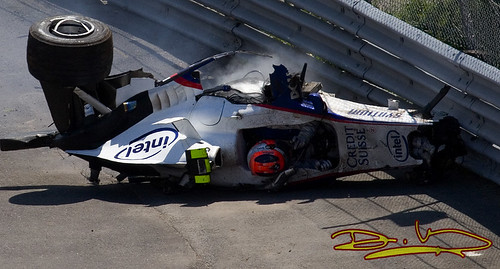
Sunday, June 10th, 2007This photo was taken by an SFF1 member moments after Robert Kubica’ high speed accident during todays Canadian Grand Prix – you can actually see his race boots sticking out of the remains of his BMW F107. It appears that Kubica hit the rear wheel of Jarno Trulli’ Toyota and was launched into the air before going headfirst into a wall. The car then bounced across the circuit flipping several times before hitting the opposite wall. Though no official figures have been released I would expect that he must have been doing at least 150 mph at the time of impact. Amazingly, despite the absolute destruction of the car, Kubica only suffered a mild concussion and a sprained ankle – it is a great testament to the safety of modern F1.
Check out the crash video below
Video from Axis of Oversteer
For more photographs, including shots of the actual crash, click through to the Flickr set.
UDATE: Another angle of the crash from a spectators handycam
[tags]F1, crash, Kubica, SFF1, formula 1, accident, youtube, vimeo, video[/tags]
Talking at Ricoh: What’s in a place?
Thursday, June 7th, 2007The following is the abstract of a talk I will be giving at the Ricoh California Research Center on Monday (11-Jun-07)
What’s in a place: Using geotagged images to explore the world
Can we automatically create an “attraction map” of the world from Flickr geotagged images and their associated tags? We performed an analysis of Flickr data and developed a visualization technique called Tag Maps to do exactly that. Using the analysis and the Tag Maps visualization, we created an exploration tool called World Explorer that allows one to, well, explore the world like never before.
The idea behind the data analysis is simple: by taking a photo, photographers essentially express their interest in a particular place, and implicitly “vote” in favor of that location. This gives us a set of highly representative tags associated with each map location. The World Explorer visualization is facilitated by placing these representative tags on a map (“a Tag Map”). We augment the Tag Map with photos that represent each tag at its specific location. Together, World Explorer effectively provides a sense of the important concepts and attractions embodied in each map area and zoom level, and allows users – tourists planning a trip, virtual world-discoverers or just some bored individuals – to explore the world via photos.
I’ll also give a brief demo and overview of Zurfer, a novel mobile phone context-aware software prototype that enables access to images on the go. It utilizes the channel metaphor to give users contextual access to media of interest according to key dimensions: spatial, social, and topical. Zurfer attempts to be playful and simple to use, yet provide powerful and comprehensive media access. A temporally-driven sorting scheme for media items allows quick and easy access to items of interest in any dimension. For novice users, and more complicated tasks, we extend the application incorporating keyword search to deliver the long tail of media and images.
[tags]talk, presentation, Ricoh, RII, CRC, TagMaps, Zurfer[/tags]