Archive for the ‘work’ Category

The ultimate mobile search experience (a.k.a Foodfinder lives)

Monday, February 9th, 2009

The folks at Yahoo oneSearch just announced the new oneSearch Shortcut application with a new auto-locate feature that determines the users location using cell-tower positioning and wi-fi triangulation. This combines with the existing voice search and oneSearch clusters to create what is in my opinion the best mobile search experience in the business (especially on Nokia S60 devices). Read on for a quick description of the user experience:

oneSearch Shortcut
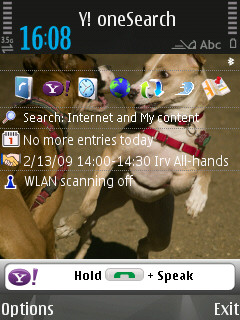
The Shortcut application starts off by showing you a small text entry field on the idle-screen of you mobile phone. The text field has a small note telling you to hold down the “Call” button and speak. I think I’ll give Slumdog Millionaire a try.

oneSearch Shortcut Voice Search
Once you have said the search term the app “thinks” for a couple of seconds before showing you the search term for confirmation. Just hit the “Search” button to start the search.

Auto-located oneSearch results
Which results in a search results page that automatically determines your current location (Sunnyvale, CA in my case) using cell-tower and wi-fi beacon positioning. Additionally since oneSearch knows that “Slumdog Millionaire” refers to a movie, it automatically displays the movie information along with the showtimes from the nearest theaters. You can even use the “Buy Tickets” link to buy your tickets so you wont have to wait in line when you get to the theater. Click through on the image above to see the full search results page which includes things like the trailer, official website, movie reviews, etc…

And of course movies aren’t the only thing you can search for this way, Shortcut helps you find any local content (restaurants, stores, etc…) based on your auto-locate location, as well as regular web content. And for those of you who prefer typing it also has search assist which allows you to auto-complete your search terms. In my opinion this integrated solution that allows users to find information (local and otherwise) by just saying what they want is the ultimate mobile search experience. Get it on your Nokia S60, Blackberry or Windows Mobile phone by visiting http://mobile.yahoo.com/onesearch/shortcut.

P.S.: For those of you who remember my Foodfinder hack from YRB – yes that’s exactly what auto-locate does :-)

P.S.S.: I do work at Yahoo! but these are as usual my personal opinions and do not reflect on the views of Yahoo!

  • Share/Bookmark

Published

Tuesday, September 23rd, 2008

My first magazine article just came out in IEEE Multimedia:

ZoneTag’s Collaborative Tag Suggestions: What is This Person Doing in My Phone?
Mor Naaman and Rahul Nair
Yahoo!

A huge thanks to my co-author Mor for both the paper and the title of this blog post :-) .

  • Share/Bookmark

Vannevar Bush Best Paper Award

Thursday, June 21st, 2007

Vannevar Bush Best Paper Award JCDL 2007
Our paper titled “World Explorer: Visualizing Aggregate Data from Unstructured Text in Geo-Referenced Collections” just won the Vannevar Bush Best Paper Award at JDCL 2007. A big thanks to my co-authors Shane Ahern, Mor Naaman and Jeannie Yang for all their help in both building the system and writing the paper – it was a great joint effort. You can read the paper, see the demo or look at my slides below.

Judith Bush has a report about my presentation as well.

  • Share/Bookmark

Trip tracker

Friday, June 15th, 2007


Trip tracker is a quick hack that I created using the FireEagle location platform from Yahoo! Research Berkeley and is designed to convery a quick summary or what I’m doing during my summer holiday. The first part is a badge image (above) that shows you some quick summary about my current location. It shows you the following things

Location: A map tile of my location which zooms appropriately based on the accuracy of the available location. This is obtained from the wonderful Yahoo! Map Image API. It also prints out the location in text. I seem to be running into some rate limiting issues with this api so the image may not always load.
Weather: This is collected from the Yahoo! Weather API and is displayed as an icon along with the temperature in Fahrenheit. the icon respect sunrise/sunset times and updates based on the lighting in that location.
Time: Current time in MY (not your) location
Photographs: This is my favourite part of the badge and its a best guess as to the Flickr image most relevant for my current context. The algorithm searches Flickr in the following order

  1. Get my most recent photograph (limit 1 hour)
  2. Get the last photo I took in this location (5 mile radius)
  3. Get the Flickr geotagged image that is closest to my current location

Detail page
If you click on the badge image you are taken to the detail page which is a really really ugly HTML page I created that includes an interactive AJAX map of my current location as well as a flash flickr widget with my latest public photos

Caching
To prevent my server from melting down the processing for the map tiles and flickr images is only done once every five minutes – if you want an updated location just wait for a few seconds or visit the detail page which shows live location on every refresh.

Tomorrow I will be leaving for a 2 week driving holiday that will take me from Oakland all the way to Vancouver and back. I will be updating my location using my ZoneTag phone and you should be able to follow my trip using the trip tracker. If you’d like to develop against the location data from my trip you can access the live data here (the most interesting part will probably be when I drive the 900 miles from Oakland to Seattle on the 16th). I will be leaving my location publicly accessible all through London hack day and possibly during the entire trip as well. Do let me know if you hack up with something cool.

P.S.: A huge thanks to Beste Nazilli for helping out with the visual look and feel of the badge – as you can probably tell she did NOT have anything to do with the detail page :-)
[tags]location, lbs, badge, track, trip tracker, fireeagle, flickr, yahoo, maps, weather, research[/tags]

  • Share/Bookmark

Media from the Green Hell

Tuesday, May 15th, 2007

The following is a post I wrote for the YRB blog. My readers get the bonus YouTube footage directly embedded on the page :-)


A few weeks ago when the research community was looking at CHI, Formula 1 racing fans were looking at Germany to watch a very different event. Nick Heidfeld was driving a F1 car around the famed Nürburgring-Nordschleife circuit in Germany. “The Green Hell” as it is popularly known is one of the toughest race tracks on the planet and last hosted an F1 race back in 1976 when Niki Lauda’ near fatal crash put an end to F1 at the track. It has since been used only for sports car racing and also as a public access race track. On April 28, BMW organized a special event where several of their racing cars would be driven around the ring including 3 laps in their 2006 BMW F1 car. The event had F1 fans all over the world speculating about possible laptimes and thousands showed up to watch the event live.

At this point you are probably wondering what this has to do with YRB. The answer is media: the very first images and videos of the event came from Flickr and YouTube. This is not new to the world of journalism, public citizens have been scooping the press for years. With the rise of the Internet, bloggers have started breaking stories and are often authorities on specific topics. However this event was a bit different because it was specifically conceived of as a public relations opportunity. The BMW PR machine had been hyping the event for weeks and had a full team there to capture the event in its full glory. Within 24 hours of the event they released a slickly edited video showing the highlights around the lap. It included onboard footage, helicopter shots and even video from chase cars. Despite all the effort and the fairly quick turnaround time, the corporate PR machine was beaten by a handful of people with cheap camcorders and Internet access. Not only was the fan media the first to be available, it also showed many things that the official video did not. You could see things like the size of the crowd, the sound of a distant F1 engine, the wait for the car to go past, there were even a few shots of the camera car.

This kind of situation leaves the consumer with an interesting choice: On one hand you have the quick and dirty fan media which is immediately available and on the other hand there is the better edited professional media which is available with some delay but usually more comprehensive. The consumer now have to decide which source they want their information from and that will depend on the topic and its time sensitivity. This choice is going to become even harder in the future as fans start editing their media more and the professionals speed up their editing process. I believe that in the end trust and authority will become the deciding factor – all else being equal users will choose the source that they trust the most.

At YRB we are very interested in both sources of media and are studying how people collect, consume, share and remix media. We don’t know what media sources will “win” but we do know that this is a very interesting time for research.

Photo by peve.de.

Official BMW video

Fan Videos


[tags]media, sharing, F1, formula 1, Nürburgring, video[/tags]

  • Share/Bookmark

Life at the Lab

Monday, March 5th, 2007

A short video about life and work at YRB. Includes demos of some cool projects as well as a glimpse of the unique Berkeley lifestyle.

Check out the original blog post on Yodel Anecdotal by Bradley.

[tags]video, YRB, Yahoo! Research Berkeley, life, PR[/tags]

  • Share/Bookmark

TagMaps is live

Saturday, January 20th, 2007

TagMaps is the latest research project to come out of my group at YRB. It is a visualization technique that displays text on geographic maps. TagMaps can be used to communicate characteristics of location-based data in an easy-to-understand way. The World Explorer in particular uses TagMaps to display Flickr tags that denote the ‘important’ tags in any given geographical area. You can play with it at http://tagmaps.research.yahoo.com/worldexplorer.php

I built much of the back end for the system and am in charge of the data apis that we uses. If you want to play with this API for yourself I suggest you head over to either the Yahoo Developer Network or to the TagMaps Yahoo group.
For more info on TagMaps check out the post on the YRB blog.

  • Share/Bookmark

Why Geotag? [Orig posted: 18/12/2006]

Saturday, January 20th, 2007

I’ve just posted a blog entry about geotagging over at the YRB Blog

Why Geotag?

  • Share/Bookmark

I’m a Hack Day Winner!!! [Orig posted: 18/06/2006]

Saturday, January 20th, 2007

I won the prize for most unexpected hack!!!

I cant tell you what it was but I do hope that I can convince someone in the company to pick it up and run with it.

More hack day coverage at
Tech Crunch
Chad Dickerson

  • Share/Bookmark

Started work at Yahoo [Orig posted: 03/06/2005]

Saturday, January 20th, 2007

orientation

I have officially started work at Yahoo! My orientation was on the 31st on May. You may now call me a Technical Yahoo!

  • Share/Bookmark