Archive for the ‘mashup’ Category

Trip tracker

Friday, June 15th, 2007


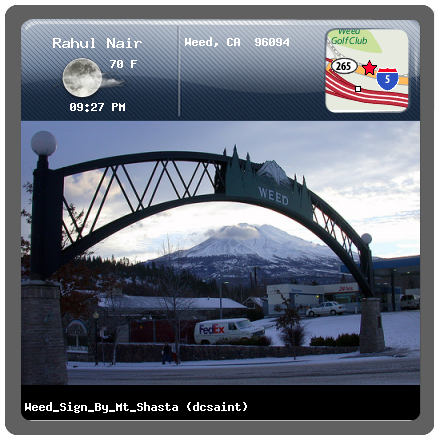
Trip tracker is a quick hack that I created using the FireEagle location platform from Yahoo! Research Berkeley and is designed to convery a quick summary or what I’m doing during my summer holiday. The first part is a badge image (above) that shows you some quick summary about my current location. It shows you the following things

Location: A map tile of my location which zooms appropriately based on the accuracy of the available location. This is obtained from the wonderful Yahoo! Map Image API. It also prints out the location in text. I seem to be running into some rate limiting issues with this api so the image may not always load.
Weather: This is collected from the Yahoo! Weather API and is displayed as an icon along with the temperature in Fahrenheit. the icon respect sunrise/sunset times and updates based on the lighting in that location.
Time: Current time in MY (not your) location
Photographs: This is my favourite part of the badge and its a best guess as to the Flickr image most relevant for my current context. The algorithm searches Flickr in the following order

  1. Get my most recent photograph (limit 1 hour)
  2. Get the last photo I took in this location (5 mile radius)
  3. Get the Flickr geotagged image that is closest to my current location

Detail page
If you click on the badge image you are taken to the detail page which is a really really ugly HTML page I created that includes an interactive AJAX map of my current location as well as a flash flickr widget with my latest public photos

Caching
To prevent my server from melting down the processing for the map tiles and flickr images is only done once every five minutes – if you want an updated location just wait for a few seconds or visit the detail page which shows live location on every refresh.

Tomorrow I will be leaving for a 2 week driving holiday that will take me from Oakland all the way to Vancouver and back. I will be updating my location using my ZoneTag phone and you should be able to follow my trip using the trip tracker. If you’d like to develop against the location data from my trip you can access the live data here (the most interesting part will probably be when I drive the 900 miles from Oakland to Seattle on the 16th). I will be leaving my location publicly accessible all through London hack day and possibly during the entire trip as well. Do let me know if you hack up with something cool.

P.S.: A huge thanks to Beste Nazilli for helping out with the visual look and feel of the badge – as you can probably tell she did NOT have anything to do with the detail page :-)
[tags]location, lbs, badge, track, trip tracker, fireeagle, flickr, yahoo, maps, weather, research[/tags]

GeoRSS maker

Tuesday, May 29th, 2007

I’ve had some time over the weekend and decided to put some finishing touches on a couple of mashups that I started a few months ago but never completed. The first of these is the GeoRSS Maker which is something I dreamed up when I was making a GeoRSS file for my F1 circuit guide. At that time the process I uses was to first make a GeoRSS template file with a bunch of empty item elements before manually looking up the geographical coordinates of each individual racetrack(usually available on wikipedia) and entering the data into the template. This process was painful enough that I decided to build an automated way to extract coordinates from Wikipedia and insert them into a GeoRSS file.

After a little bit of searching I found the Geonames.org website which is a “geographical database is available for download free of charge under a creative commons attribution license. It contains over eight million geographical names and consists of 6.5 million unique features…”. The data is accessible through a webservice which allows you to send in a query sting and they will return a list of locations that match the query string. Now this is excellent when it comes to names of cities and towns but unfortunately their database does not yet include information about smaller features within a city such as racetracks. Fortunately they have realized this and have a second webservice that allows you to do a full text search of geocoded Wikipedia articles to extract the locations such as Silverstone circuit or Brands Hatch.

Inner workings
When the user enters a search term and presses the “Search” button, GeoRSS maker contacts the Geonames webservice and returns the top 5 results that match the users query. If there are no results it searches Wikipedia for geocoded articles that match the search term. All results are shown along with links to the originating website as well as Google and Yahoo maps of that location. Once the user has verified the location from the description and links, he/she can hit the “Add (Item)” button to add the item to the GeoRSS displayed on the bottom of the page. The user can do multiple searches and once all the required items are added he/she can just copy and paste the GeoRSS to save it as a separate text file. Advanced users can enter text to the category field if they want to set the category on the output GeoRSS items (this was mainly done because TagMaps uses the category field as a size parameter). The “Clear” button will erase all the search results as well as reset the GeoRSS output.

Head on over to the GeoRSS Maker webpage to try it out for yourself. As always this is a mashup with no guarantees – use at you own risk.

F1 circuit guide

Thursday, March 15th, 2007

SFF1 just used a version of my F1 circuit guide on their site. It was inspired by Shane SF neighbourhood guide and is a mashup of several technologies including:

I’ll go into more details in a later post but it basically uses the TagMaps callback function to pull in content from Flickr, Wikipedia and Youtube to give a quick overview of each track.

You can also play with a version of the guide on my website.

[tags]F1, Formula 1, circuit guide, TagMaps, mashup, Pipes, Flickr, Wikipedia, YouTube[/tags]